The editor workspace is one of the fundamental parts of Marketing Automation. This area will be a graphical representation of the role where you can easily build and/or edit your own scenarios.
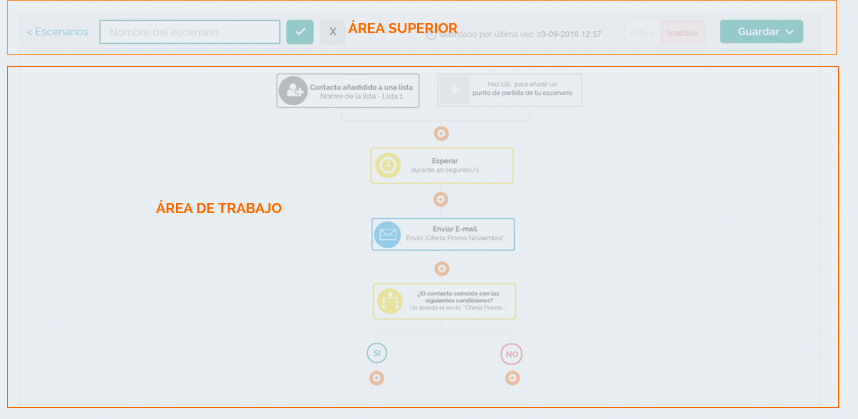
Fundamental parts:
Top area: with the main actions that affect the whole workflow and the body, this area is where the user will design the paths by modules, entry points, actions and conditions.
The upper area contains the following elements: a link back to the Scenarios page with the literal "Scenarios", an input box for the user to set/edit the scenario name, the buttons enable and disable scenario and a global button that gives the user the possibility to save the scenario. It also includes a button to view the statistics in real time.
Workspace
This is the area where you will design the flows through the different elements: entry points, actions and conditions.
Modules
Modules are the main elements that form the workflow diagram. Through them the user will be able to see a summary of each of the steps being designed. The modules are made up of 2 distinct parts: Left: an iconography "representing the entry point, the step or the chosen action" with its respective background. On the right the text corresponding to that action.
Undo and Redo function
In order to correct unexpected errors during the scenario creation process, MDirector has an undo and redo function that saves 20 actions in both directions. The button on the left undoes actions, while the one on the right redoes actions undone by the other button.
Just like the rest of the editor, every time one of these two buttons is pressed, the changes are saved.
Comments